Do Visual Navigators Still Need a Map?
The complete benchmark implementation is open source: Code on GitHub.
Background
A robot that has visited a place before can use a map to guide its next journey. For large-scale navigation, however, building and maintaining that map is part of the problem: how much information must we collect before the robot can find its way reliably? Our earlier work explored lightweight visual maps as an answer. First, LiteVLoc [1] combined place recognition, feature matching, and pose-graph optimization to support autonomous, global, continuous localization on sparse topological maps. Then, OpenNavMap [2] extended this direction toward crowdsourced navigation systems. Motivated by mapping with multiple devices, it addressed landmark-free multi-session mapping so that separate traversals could contribute to a shared map. Meanwhile, frontier vision-language models such as OpenAI's GPT-6 Astra [3] make us curious about what a model can infer from the camera view and a goal image alone. Can it understand the space and steer a robot through it? Intuitively, a map should help. Yet how much a prior visual map helps, which observations are worth keeping, and whether map priors can impair the model's own navigation remain unclear. We therefore compare dense, sparse, and absent visual maps while varying access to localization in a shared image-goal navigation task.
Problem Setup
Task and evaluation scope
We use image-goal navigation to test whether a robot can connect visual recognition with movement. A goal image specifies where to go and which direction to face, allowing us to compare how different navigation methods use visual observations and prior maps. The robot must reach the place where the goal image was captured and face the same direction. We manually collect five independent routes per scene and build one prior topometric map per route, sampled at two densities. Evaluation now covers five routes in each of ENV0, ENV1 and ENV3, run once per method and route. ENV1 and ENV3 use the uniformly re-evaluated results described below.
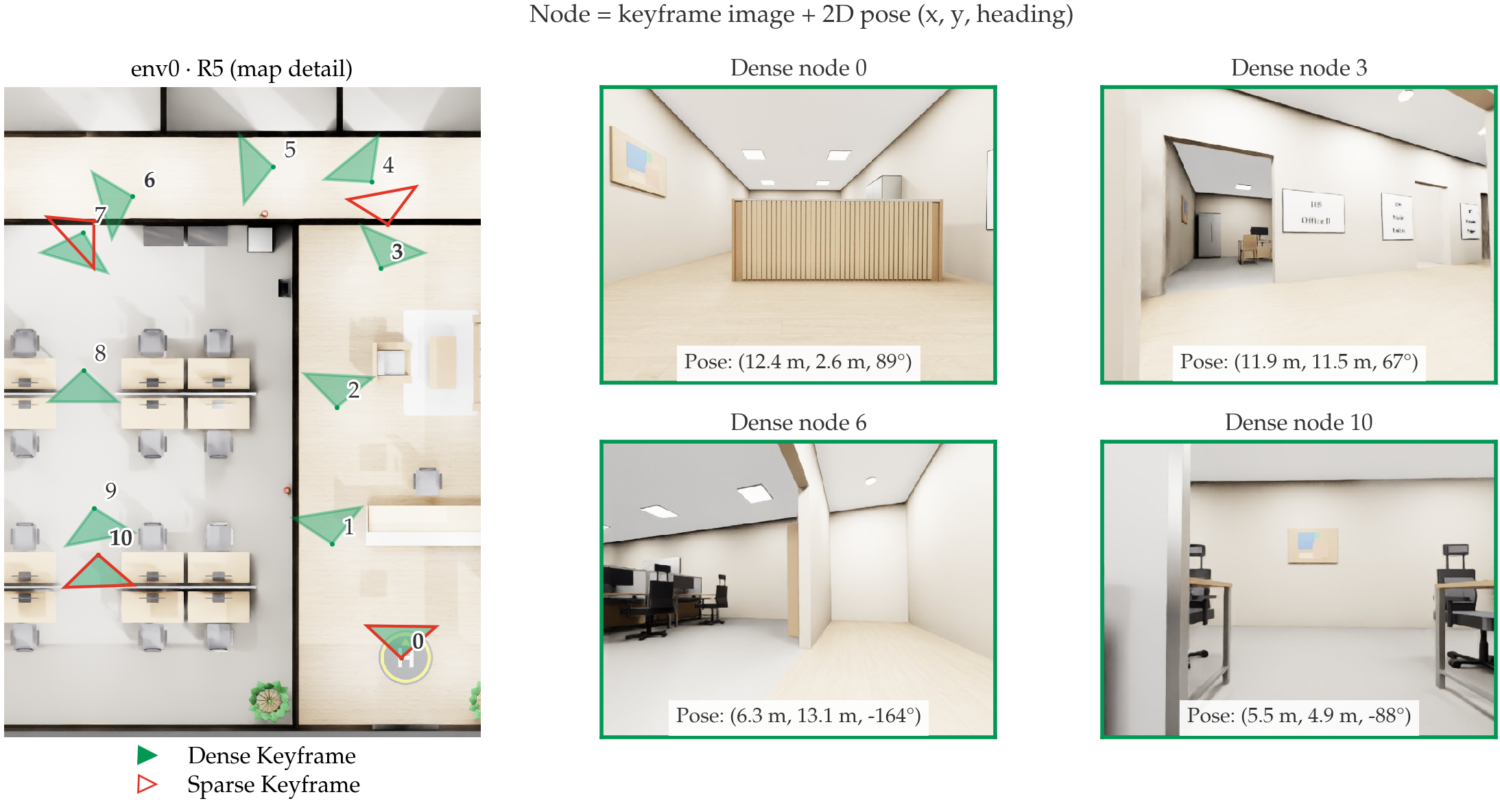
What a topometric map contains
A topometric map stores keyframe images with their 2D poses and graph connections along recorded routes. These connections provide a prior about which transitions belong to a traversable route; they do not by themselves provide a local motion plan or a facility-control skill.
Success and metrics
| Criterion | Definition |
|---|---|
| Success | Declare arrival within 0.5 m and 45° of the pose of the goal image. |
| Run protocol | Each method runs each route once. |
| SR | Success rate. |
| SPL | Success weighted by path efficiency against the experiment’s fixed reference path; failures score zero. |
Baselines
We compare seven methods on the same Go2 robot, routes, and success criterion. Go2 carries a forward-facing RGB-D camera.
-
SRU [4] uses depth, odometry, and a target coordinate. It outputs forward and lateral velocities and a yaw rate (
vx, vy, wz). It never sees the goal image. -
VLM (GPT-6 Astra) receives only RGB images, including the goal image, with no depth, odometry, or coordinates. It outputs the same velocity commands (
vx, vy, wz), plus decisions about subgoal arrival and task completion.
| ID | Map | Localization | Planner | How subgoal arrival is determined |
|---|---|---|---|---|
| B0 | Dense | Continuous | SRU (point goal) | By ground-truth pose |
| M1 | Sparse | Continuous | SRU (point goal) | By ground-truth pose |
| M2 | Dense | Continuous | VLM (image goal) | By ground-truth pose |
| M3 | Sparse | Continuous | VLM (image goal) | By ground-truth pose |
| M4 | Dense | Initial only | VLM (image goal) | VLM decides when it has reached the current subgoal image |
| M5 | Sparse | Initial only | VLM (image goal) | VLM decides when it has reached the current subgoal image |
| M6 | None | None | VLM (image goal) | No subgoals; only the final goal image |
B0/M1 isolate map density for SRU; M2/M3 replace SRU with a VLM. M4/M5 remove continuous localization, and M6 removes the map entirely. Continuous localization uses ground-truth pose to determine subgoal completion and episode termination. Initial-only localization supplies a starting pose fix, then relies on visual recognition. The VLM itself never receives pose coordinates.
Physics and locomotion
Unlike HM3D-based image-goal benchmarks [5], including Instance-ImageNav [6], we simulate Go2 with furniture, collisions, and continuous velocity commands. MoE-CTS [7], the quadruped locomotion controller, executes those commands.
Implementation
We run the experiments in NVIDIA Isaac Sim, simulating a Unitree Go2 with physics, collisions, and camera observations.
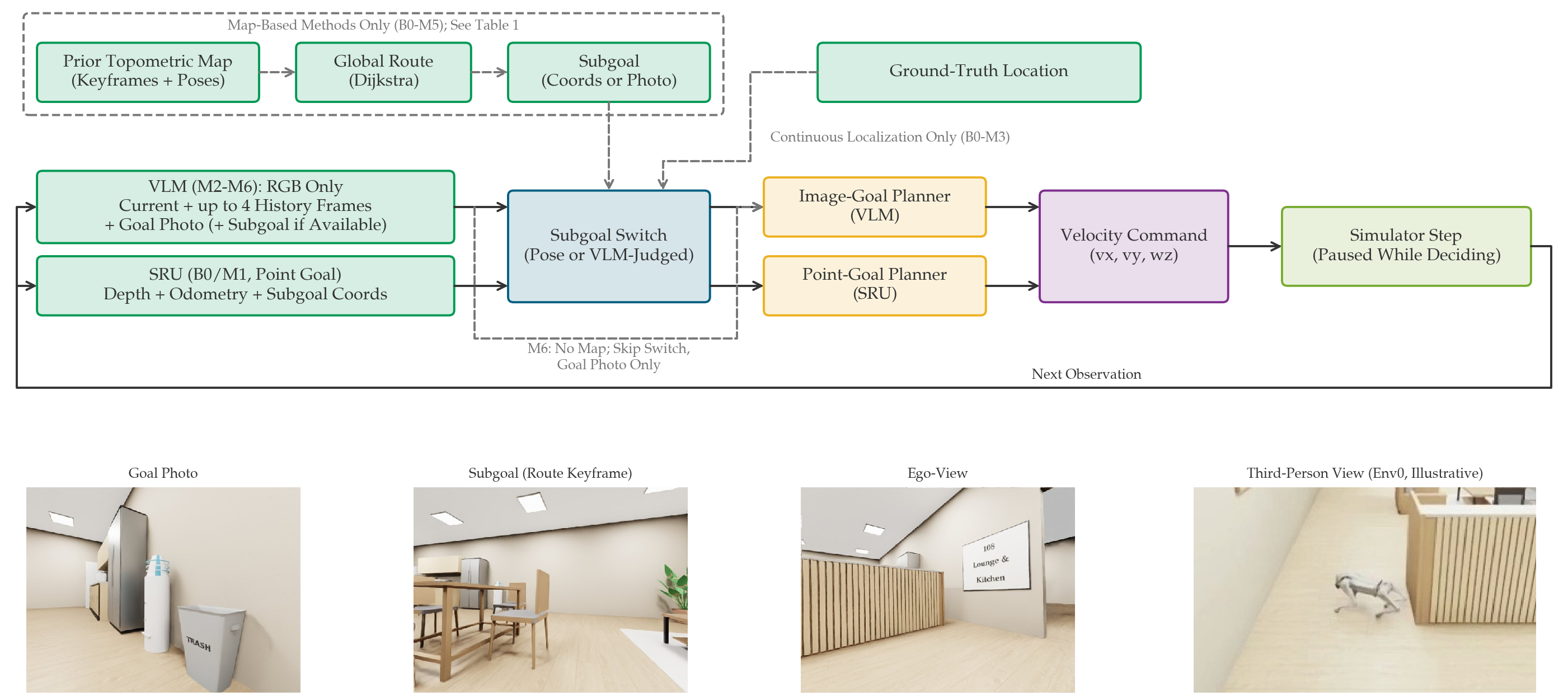
- Route. B0–M5 use Dijkstra's algorithm to select subgoals; M6 sees only the final goal image.
- Recognize progress. Continuous localization checks subgoals by pose; M4/M5 recognize arrival from images.
-
Act and repeat. SRU [4] uses depth, odometry, and coordinates. The VLM sees the current RGB frame, up to four history thumbnails, and goal and subgoal images. Both output
vx, vy, wz.
Timing and prompt
VLM commands last 1.0 s; SRU commands last 0.2 s. Simulation pauses during decisions, so compute latency does not consume the episode budget (90 s in ENV0/ENV1; 120 s in ENV3). Mapped ENV3 elevator runs use a shared depth/odometry-based transfer controller; the VLM pauses during this phase. The original VLM system prompt follows.
Full system prompt
Experiments and Results
Five routes per environment, one run per method and route. All seven methods are reported below. Each environment has one matched B0/M5/M6 video comparison, with routes numbered R1–R5 locally.
ENV0 and ENV1: 90 s. ENV3: 120 s. ENV1/ENV3 include uniformly re-evaluated B0/M1 results under the same scene budgets. ENV0 retains its historical final runs; cross-scene results are not a controlled version comparison.
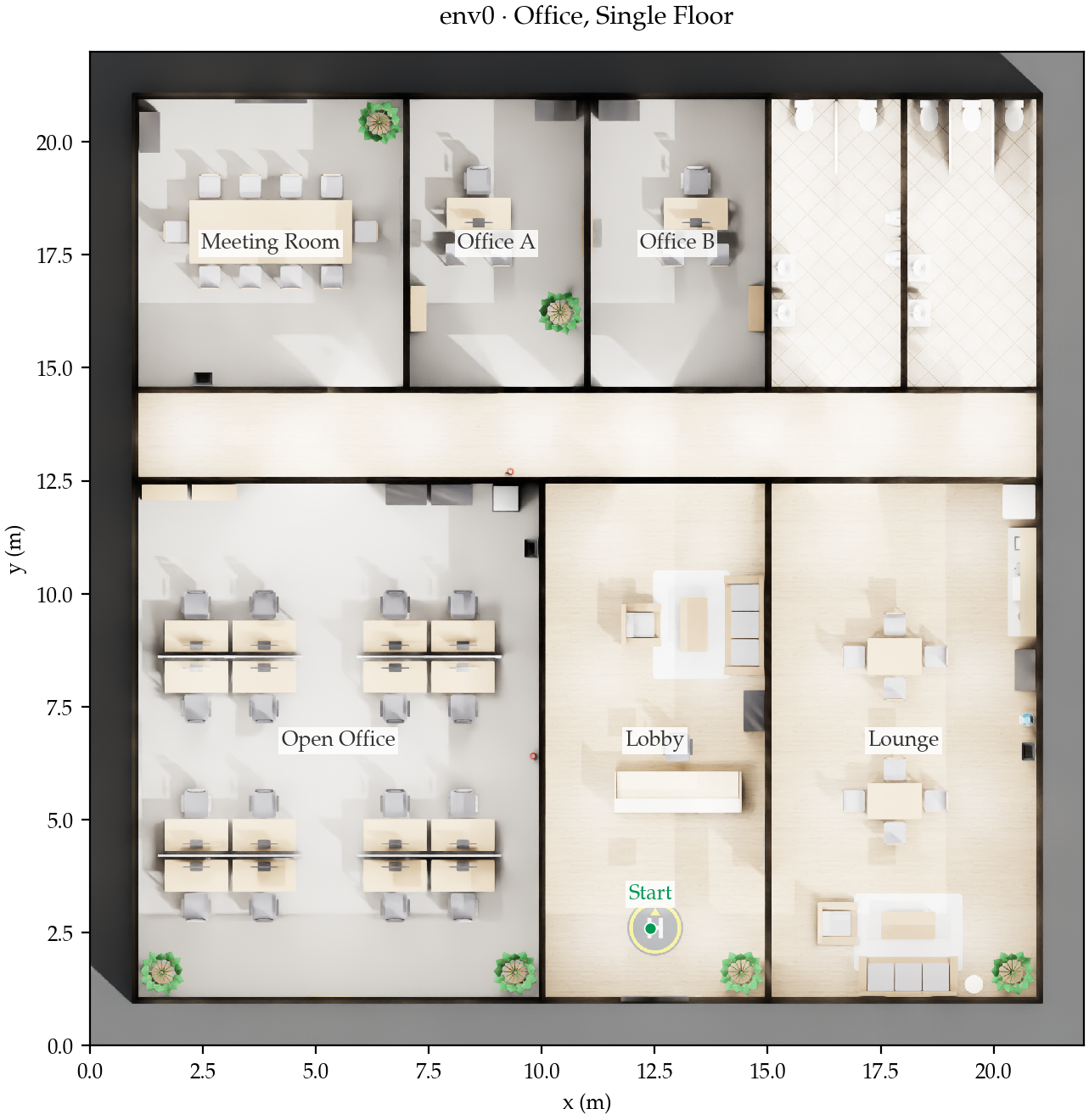
ENV0 · Single-floor office
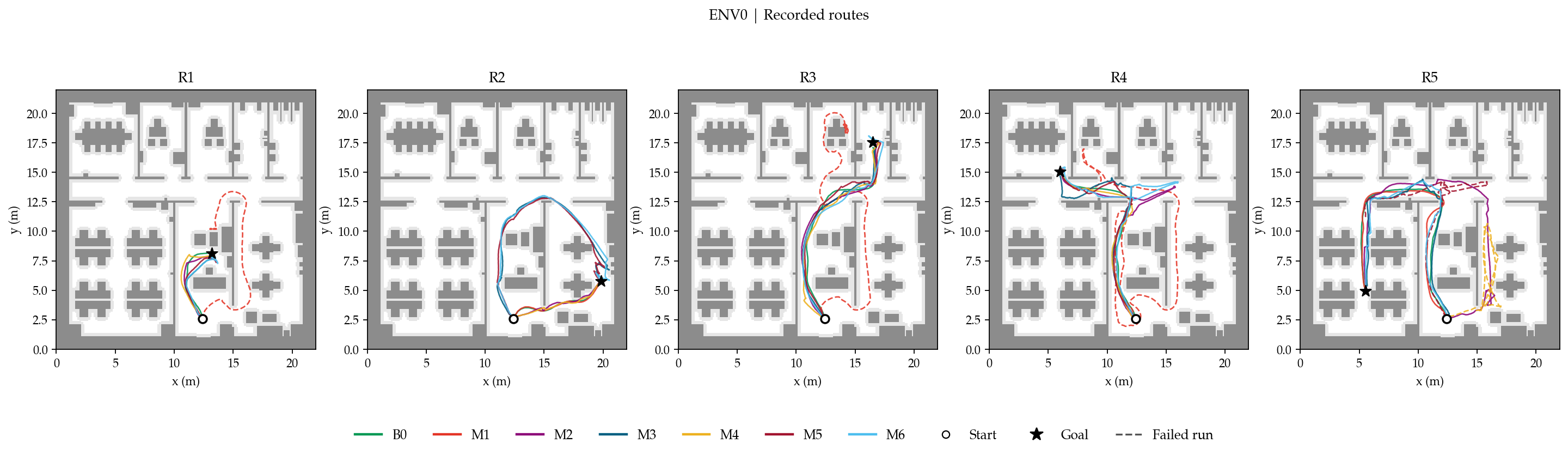
B0 and M2/M3/M6 complete all five routes. A sparse map with visual handoffs is not always better: M5 loses the route on the selected open-office example.
| ID | Success / 5 | SPL ↑ | Success time · s |
|---|---|---|---|
| B0 | 5/5 | 0.975 | 20.7 |
| M1 | 2/5 | 0.390 | 23.1 |
| M2 | 5/5 | 0.841 | 37.2 |
| M3 | 5/5 | 0.807 | 41.6 |
| M4 | 4/5 | 0.720 | 28.5 |
| M5 | 4/5 | 0.582 | 40.2 |
| M6 | 5/5 | 0.700 | 44.4 |
SPL combines success and path efficiency (failures score zero); it is not a time metric. Time is the mean simulated time over successful runs only.
R5 · Open office
The same route, ordered B0, M5, M6. Replayed saved observations at 2.5× speed.
Open video
Open video
Open video
All five routes and individual outcomes
| ID | R1 | R2 | R3 | R4 | R5 |
|---|---|---|---|---|---|
| B0 | ✓ | ✓ | ✓ | ✓ | ✓ |
| M1 | — | ✓ | — | — | ✓ |
| M2 | ✓ | ✓ | ✓ | ✓ | ✓ |
| M3 | ✓ | ✓ | ✓ | ✓ | ✓ |
| M4 | ✓ | ✓ | ✓ | ✓ | — |
| M5 | ✓ | ✓ | ✓ | ✓ | — |
| M6 | ✓ | ✓ | ✓ | ✓ | ✓ |
✓ success; — failure.
ENV1 · Garden and indoor–outdoor transitions
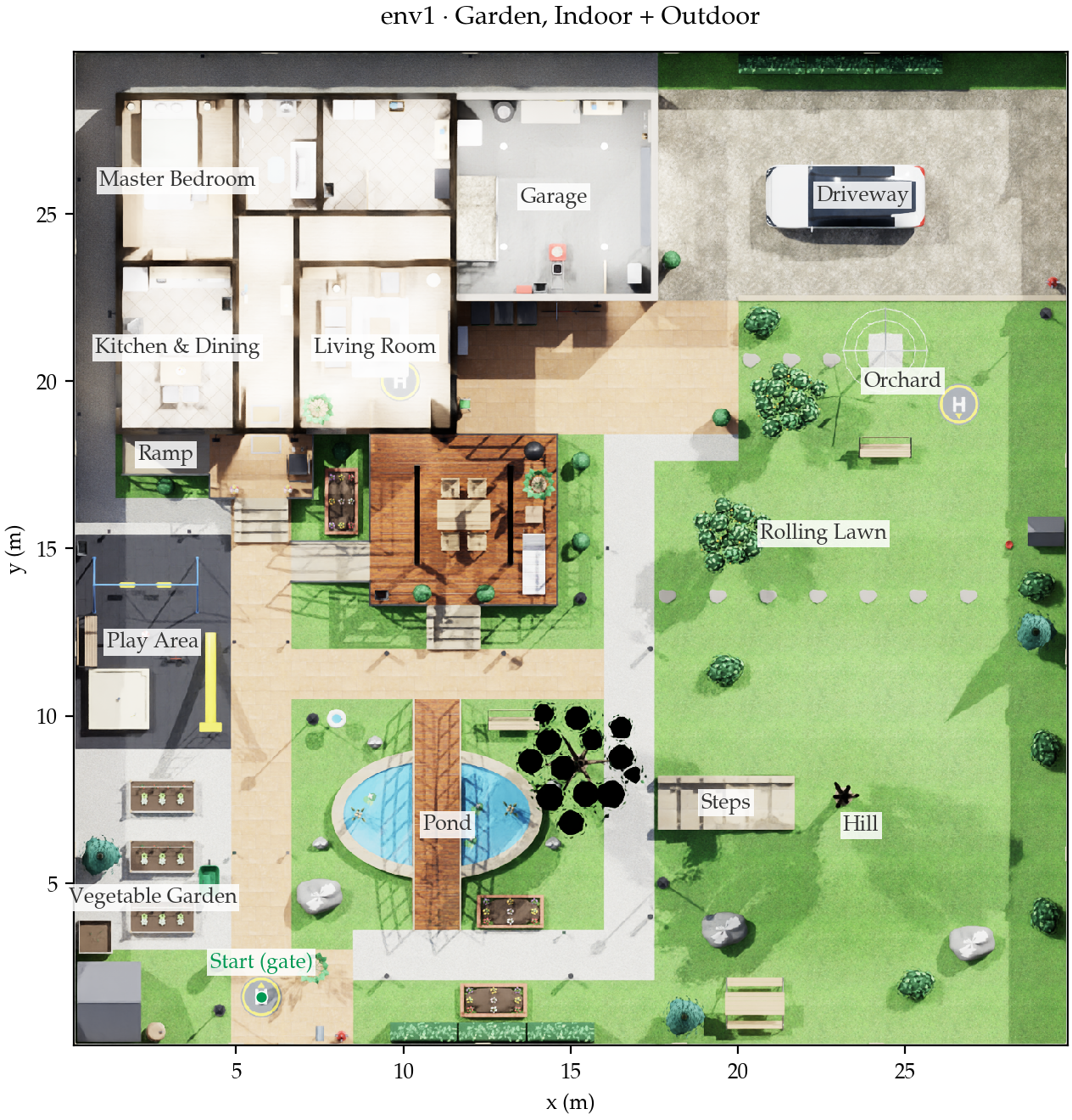
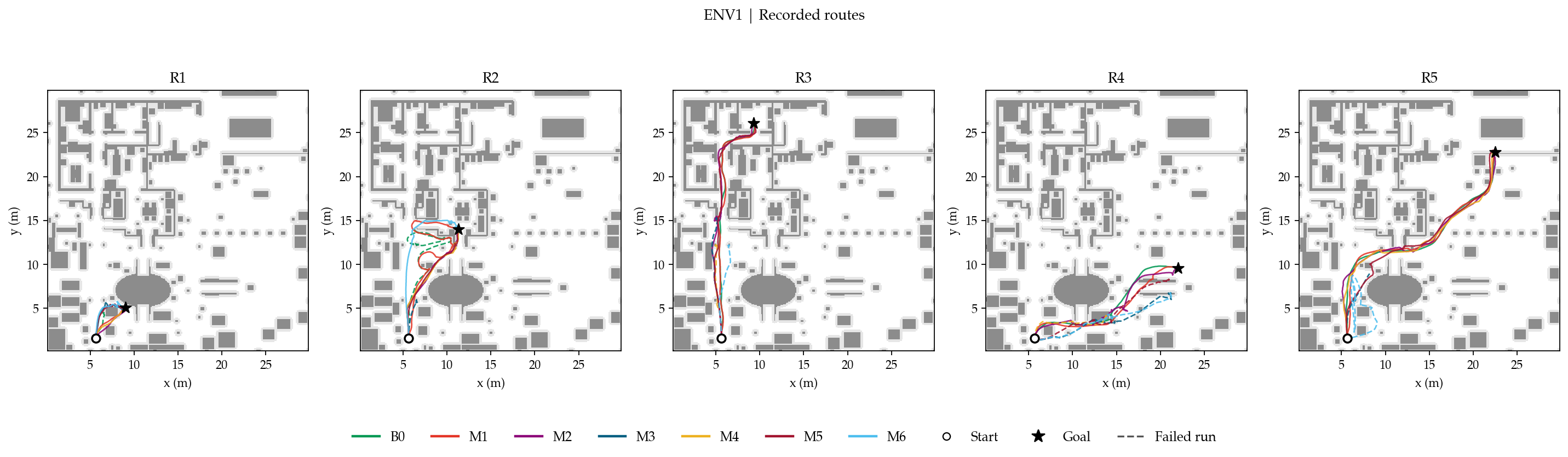
M1 and M2 complete all five routes; M5 completes four and M6 two. On the terrace route, visual control finds an approach that the dense point-goal baseline does not complete.
| ID | Success / 5 | SPL ↑ | Success time · s |
|---|---|---|---|
| B0 | 3/5 | 0.595 | 38.3 |
| M1 | 5/5 | 0.898 | 36.3 |
| M2 | 5/5 | 0.956 | 41.6 |
| M3 | 1/5 | 0.124 | 24.0 |
| M4 | 3/5 | 0.584 | 33.3 |
| M5 | 4/5 | 0.709 | 43.5 |
| M6 | 2/5 | 0.265 | 41.0 |
SPL combines success and path efficiency (failures score zero); it is not a time metric. Time is the mean simulated time over successful runs only.
R2 · Terrace
The same route, ordered B0, M5, M6. Replayed saved observations at 2.5× speed.
Open video
Open video
Open video
All five routes and individual outcomes
| ID | R1 | R2 | R3 | R4 | R5 |
|---|---|---|---|---|---|
| B0 | — | — | ✓ | ✓ | ✓ |
| M1 | ✓ | ✓ | ✓ | ✓ | ✓ |
| M2 | ✓ | ✓ | ✓ | ✓ | ✓ |
| M3 | ✓ | — | — | — | — |
| M4 | ✓ | ✓ | — | — | ✓ |
| M5 | ✓ | ✓ | ✓ | — | ✓ |
| M6 | ✓ | ✓ | — | — | — |
✓ success; — failure.
ENV3 · Two-floor office
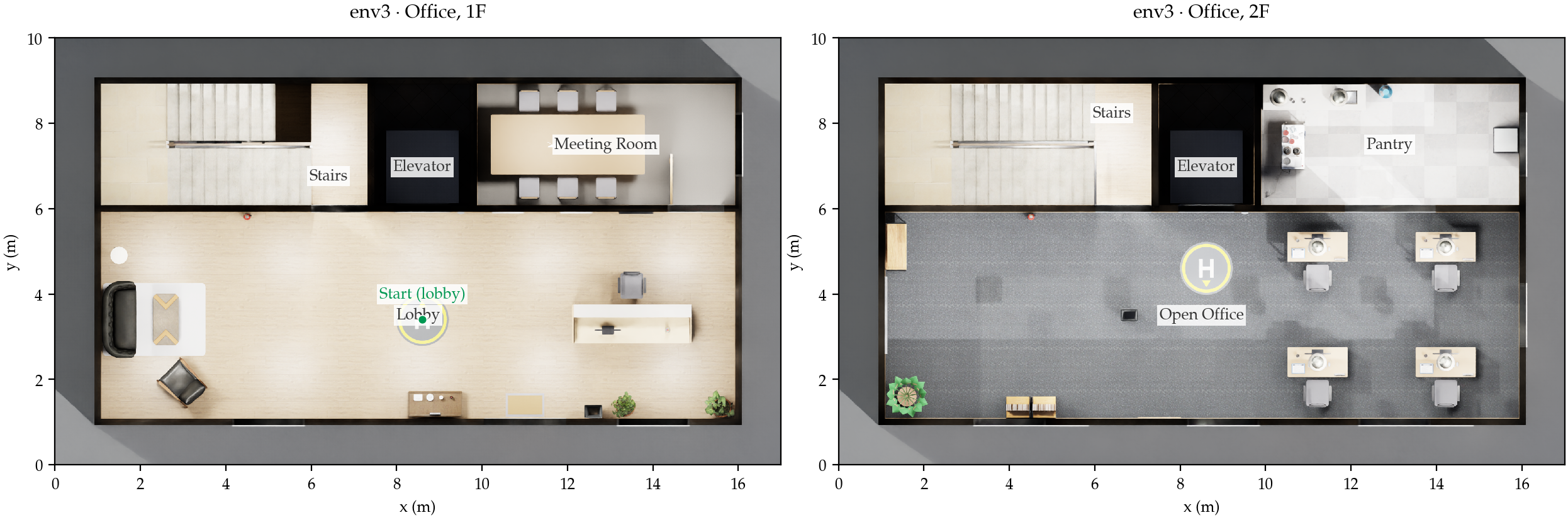
M3 completes all five routes; B0/M2/M4/M5 complete four and M6 two. The selected elevator route contrasts an available cross-floor route with map-free exploration that remains on the first floor.
| ID | Success / 5 | SPL ↑ | Success time · s |
|---|---|---|---|
| B0 | 4/5 | 0.792 | 19.2 |
| M1 | 2/5 | 0.385 | 10.0 |
| M2 | 4/5 | 0.748 | 45.0 |
| M3 | 5/5 | 0.927 | 44.8 |
| M4 | 4/5 | 0.629 | 49.1 |
| M5 | 4/5 | 0.721 | 41.0 |
| M6 | 2/5 | 0.329 | 26.0 |
SPL combines success and path efficiency (failures score zero); it is not a time metric. Time is the mean simulated time over successful runs only.
R3 · 2F open office via elevator
The same route, ordered B0, M5, M6. Replayed saved observations at 2.5× speed.
Open video
Open video
Open video
All five routes and individual outcomes
| ID | R1 | R2 | R3 | R4 | R5 |
|---|---|---|---|---|---|
| B0 | ✓ | ✓ | ✓ | ✓ | — |
| M1 | ✓ | ✓ | — | — | — |
| M2 | ✓ | ✓ | ✓ | — | ✓ |
| M3 | ✓ | ✓ | ✓ | ✓ | ✓ |
| M4 | ✓ | ✓ | ✓ | — | ✓ |
| M5 | ✓ | ✓ | ✓ | — | ✓ |
| M6 | ✓ | ✓ | — | — | — |
✓ success; — failure.
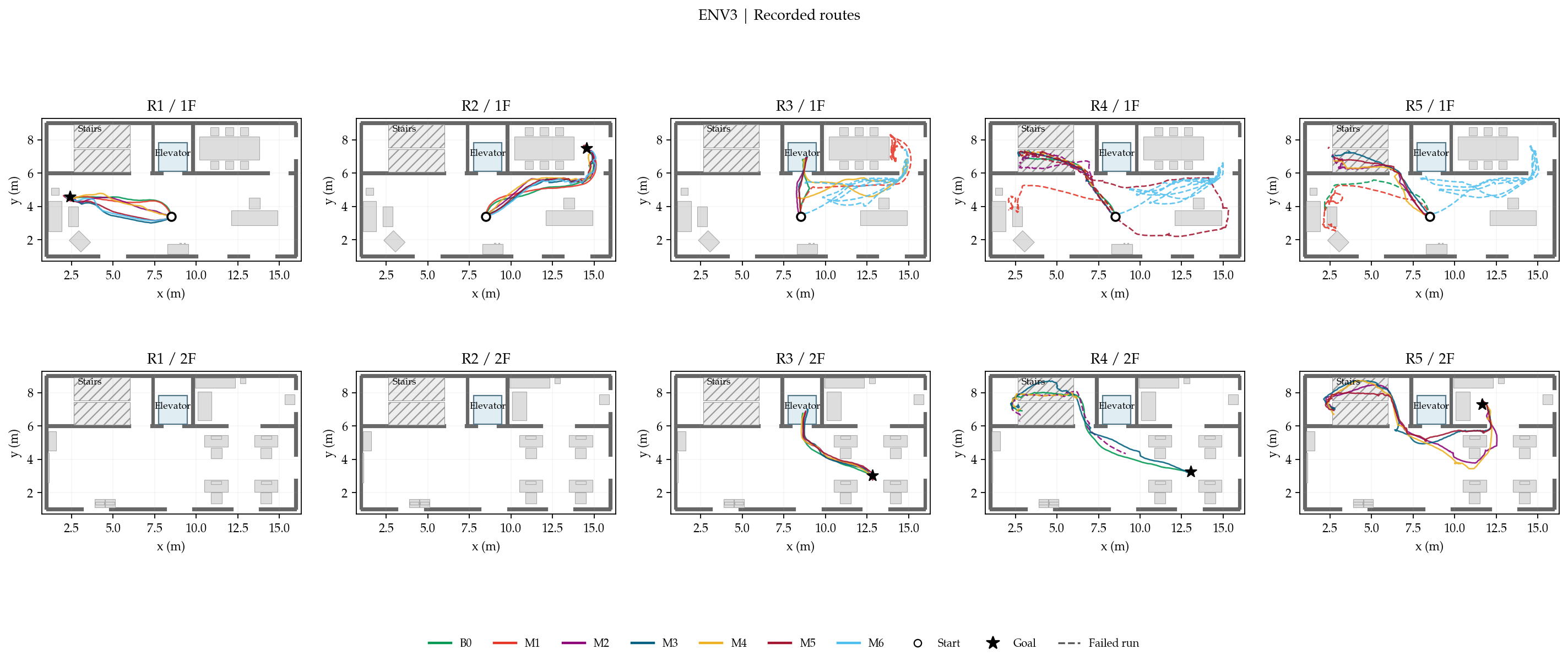
SPL uses each experiment's fixed reference path (shortest-path reference in ENV0; agreed route reference in ENV1/ENV3). Figures and videos add inspection labels only; they do not change method inputs. Download results and source hashes.
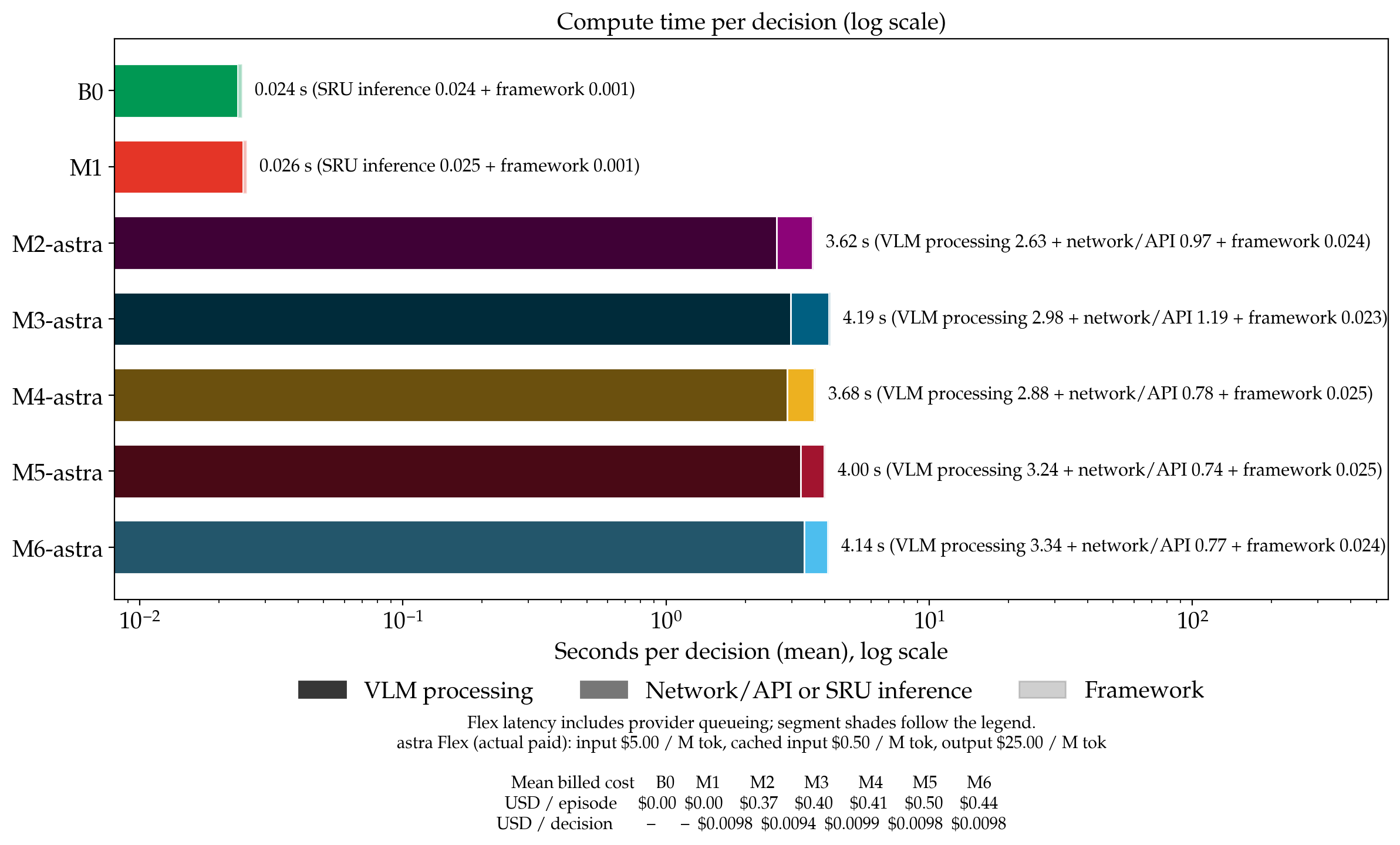
Token cost and decision latency
Discussion
1. Useful maps need executable transitions
Maps help when their keyframes and connections support an actionable route; more keyframes alone are not a general solution. Dense maps outperform sparse maps for SRU in ENV0 and ENV3, while the ordering reverses in ENV1. M5 succeeds on four of five routes in every scene, but M2/M3 are stronger in some settings. One revealing case is ENV3: M6 recognizes stairs and elevators yet remains on the first floor, whereas mapped elevator runs complete the transition with a shared transfer controller. This points to the value of route structure and execution support; success cannot be credited to the map or VLM alone.
2. Progress checks must match the navigation loop
Accurate localization does not guarantee a smooth interaction with a visual planner. On ENV3 R5, M2 keeps receiving the same subgoal image for 44 decisions despite repeatedly declaring arrival: the prompt promises a new image, while the pose gate retains the old one. Conversely, accepting visual arrival too early can skip a needed transition. These cases motivate a consistent handoff that combines recognizable landmarks, reachability and route progress, with clear feedback when a subgoal is not advanced. The current runs do not isolate which cue would resolve the failures.
3. Let the robot choose its map and memory
Choosing useful keyframes and deciding what to remember could reduce human intervention throughout navigation. Our exploratory variants select maps once per route (AM), memory at each step (AMem), or both (AMM). With the same keyframe count, AM improves ENV0 success from 4/5 to 5/5; AMem reduces mean input tokens per call by 22.5% across 15 routes, but needs more calls. Each variant succeeds on 10/15 routes versus 12/15 for historical M5. These signals motivate linking selection to execution feedback, progress checks and recovery, rather than assuming selection alone is sufficient. Online map reselection remains untested.
Scope: five routes per environment, one run per cell. ENV0 is a historical baseline; ENV1 and ENV3 use a later frozen version and different scene budgets. These observations do not establish statistical or causal effects.
References
- [1] J. Jiao et al., “LiteVLoc: Map-Lite Visual Localization for Image Goal Navigation,” in Proceedings of the IEEE International Conference on Robotics and Automation (ICRA), 2025, pp. 5244–5251. doi:10.1109/ICRA55743.2025.11128511.
- [2] J. Jiao et al., “OpenNavMap: Multi-Session Appearance-Based Topometric Mapping for Scalable Visual Navigation,” IEEE Transactions on Robotics, 2026. arXiv:2601.12291.
- [3] OpenAI, “Safety overview: GPT-6 Astra,” Sep. 3, 2026. [Online]. Available: https://openai.com/index/safety-overview-gpt-6-astra/.
- [4] F. Yang, P. Frivik, D. Hoeller, C. Wang, C. Cadena, and M. Hutter, “Spatially-enhanced recurrent memory for long-range mapless navigation via end-to-end reinforcement learning,” The International Journal of Robotics Research, vol. 45, no. 11, pp. 1682–1706, 2026. doi:10.1177/02783649251401926.
- [5] S. K. Ramakrishnan et al., “Habitat-Matterport 3D Dataset (HM3D): 1000 Large-scale 3D Environments for Embodied AI,” in Proceedings of the Neural Information Processing Systems Track on Datasets and Benchmarks, vol. 1, 2021. [Online]. Available: NeurIPS proceedings.
- [6] J. Krantz et al., “Navigating to Objects Specified by Images,” in Proceedings of the IEEE/CVF International Conference on Computer Vision (ICCV), 2023, pp. 10916–10925. [Online]. Available: CVF proceedings.
- [7] T. Wu et al., “Toward Reliable Sim-to-Real Predictability for MoE-based Robust Quadrupedal Locomotion,” in Robotics: Science and Systems (RSS), 2026. [Online]. Available: Author project page.
Acknowledgements
This benchmark and article were developed by Jianhao Jiao (jiaojh1994@gmail.com). The author thanks Mr. Jincheng Wang, Mr. Jingwen Yu, and Dr. Runsheng Wang for helpful discussions.